

Project 002 - Modem Monitor
- Details
- Published: Saturday, 05 December 2015
- Hits: 14580
Updated: 27/04/12
DISCLAIMER: This design is experimental, so if you decide to build one yourself then you are on your own, I can't be held responsible for any problems/issues/damage/injury that may occur if you decide to follow this build and make one yourself.
INTRO

IanJohnston.com is hosted at home on a couple of DSL lines, and doing the important part of DSL, routing web traffic & emails to my servers is a Draytek 2820n modem/router.
The Draytek has been working reasonably well but not good enough to give it top marks. The problem is that lately it has been re-booting or locking up approx. once per day, and if you google the problem it's actually quite rife! Some folks will suffer terribly, whilst others never seem to experience the problem at all.
Draytek are aware of the issue and are working on it, meantime it is something of a pain. So, with the basis of an idea prompted from a work colleague (cheers Dave!), I sought to see if I could design & build it from bits n bobs I had lying around.
So, after just a day which included writing the code from scratch and putting together the hardware based on an Arduino & Ethernet Shield the Modem Monitor was done. Basically, the device ping's the router and if it doesn't get a response then it will cycle the DC power to it.
In detail: On power up the Monitor passes power to Router, then after 60secs (to give the router time to boot) IP monitoring starts.
The monitor pings the Router every 15secs and if it gets no response it'll then drop the power to router for 4secs.
Once power is resumed then IP monitoring won't start again for 60secs, just like power up.
To make things a little more user friendly there's an LCD to display the following:
- Monitor Status
- Current Ping Time
- Output Power Status
- No. of resets recorded
- Minutes since last two resets
- Timing indicator (seconds)
So far it's working fine, the first day I had it running it gave me 3 recycles.............but hopefully Draytek will come through and fix their firmware, but I guess it won't harm things leaving this running as a backup to any dropouts/lockups however they might be caused.
HARDWARE
1 * Arduino Uno
1 * Arduino Ethernet Shield
1 * 4x20 backlit LCD with a ByVacLCD I2C adaptor board (BV4218)
1 * ABS enclosure
1 * ZVN3306A FET (used to drive relay)
1 * 10k resistor
1 * PB switch, momentary N.O.
1 * 12vdc Relay (I used a 185ohm coil) c/w pcb base. N.C. contact is used
1 * Small piece of vero board
1 * Pcb terminals (1off 2-way, 1off 3-way)
1Lot * Misc. spacers for mounting the Arduino Uno & relay pcb.
SOFTWARE
Download - here.
NOTES:
Only compiles under Arduino 0023 and below (not Arduino 1.0).
Any necessary libraries outside the original IDE install are provided ( LCD, network ping and the software timer).
WIRING/SCHEMATIC

PHOTOS
The internals of the monitor:
4*20 LCD, Arduino Uno, Ethernet Shield & relay.
Connections are DC power in, DC power out (to modem), Ethernet & USB.
Note: With the Arduino Uno powered from 12vdc (within spec.) the on-board regulator on the Uno gets hot to touch so I've drilled a few large holes around the enclosure to allow it to breath.

Here's the LCD when the monitor is up & running and the modem is responding.
At the right side you can see the last two resets logged (bothing showing zero, i.e. no resets so far).
At the top right is an actvity counter showing the 15 seconds between ping's.

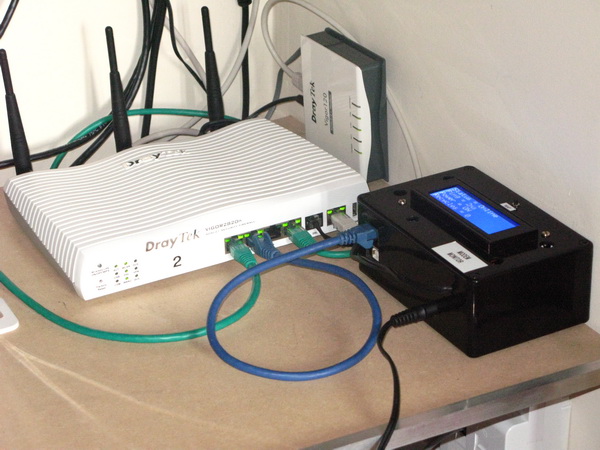
Here's the Monitor installed in my server cupboard next to the Draytek modem/router.
Here's the main .pde file for review, but you will need the full zip linked above:
1/*2Modem Monitor - V1.3 27/04/12 Ian Johnston3Ping Draytek Router, if no response then resets power to router via relay.4Hardware:5Arduino Uno & Ethernet Shield64x20 backlit LCD with a ByVacLCD I2C adaptor board (BV4218)7Functions:8On power up Monitor passes power to Router. After 60secs monitoring starts.9Ping Router every 15secs and if no response then drop power to router for 4secs.10If power has been dropped then don't start monitoring again for 60secs.11LCD display:12Monitor Status, Ping time, Power Status, No. of recycles, Minutes since last two resets & also timing indicator13*/14 15#include "Wire.h"16#include "SPI.h"17#include "Ethernet.h"18#include "ICMPPing.h"19#include "ByVacLCD.h"20#include "TimedAction.h"21#include "string.h"22 23ByVacLCD bv = ByVacLCD(0x21,4,20);24 25byte mac[] = {0xDE, 0xAD, 0xBE, 0xEF, 0xFE, 0xED}; // mac address for ethernet shield26byte ip[] = {192,168,1,177}; // ip address for ethernet shield27byte pingAddr[] = {192,168,1,1}; // ip address to ping28SOCKET pingSocket = 0;29char buffer [256];30 31int outRelay = 2; // digital pin 2 drives external relay (NC contact)32int inInhibit = 3; // digital pin 3 Inhibit toggle switch33 34int recyclecounter = 0;35int active = 0;36int pingtime = 0;37unsigned long resetlatest = 0; // last reset in minutes38unsigned long resetprevious = 0; // last reset in minutes39 40// Initializes TimedAction 1 & 2 - Timer Interrupt41TimedAction Timedact01 = TimedAction(1000,TimerService01); // 1sec timer42int tickcount = 0;43int tickcount2 = 0;44TimedAction Timedact02 = TimedAction(60000,TimerService02); // 1min timer45 46// *********************** Setup **************************47void setup() {48 49 delay(2000); // Give LCD & Ethernet Shield time to boot50 51 pinMode(outRelay, OUTPUT); // sets the digital pin as output52 pinMode(inInhibit, INPUT); // sets the digital pin as input53 digitalWrite(inInhibit, HIGH); // activate pull-up resistor54 55 // start Ethernet56 Ethernet.begin(mac, ip);57 Serial.begin(9600);58 59 //Set up the LCD60 bv.init();61 bv.backlightOnOff(0);62 delay(500);63 bv.backlightOnOff(0); // hardware issue? sometimes needs this 2nd go64 bv.clear();65 bv.setCursor(0,0); bv.print(" "); // lcd (row,column)66 bv.setCursor(1,0); bv.print(" ");67 bv.setCursor(2,0); bv.print(" ");68 bv.setCursor(3,0); bv.print(" "); 69 delay(2000);70 71 digitalWrite(outRelay, LOW); // Activate relay, power up router72 bv.setCursor(1,0); bv.print("DC Out=");73 bv.setCursor(1,8); bv.print("ON");74 75 bv.setCursor(0,0); bv.print("Status= Power Up ");76 delay(60000); // wait 60secs for router to power properly and have an IP ready77 bv.setCursor(0,0); bv.print("Status= 1st Scan ");78 79 bv.setCursor(3,0); bv.print("Resets=");80 bv.setCursor(3,8); bv.print(recyclecounter);81 82 bv.setCursor(1,12); bv.print("|"); // Lcd real estate dividers83 bv.setCursor(2,12); bv.print("|");84 bv.setCursor(3,12); bv.print("|");85 86 bv.setCursor(1,14); bv.print("Last=");87 bv.setCursor(2,14); bv.print(resetlatest);88 bv.setCursor(3,14); bv.print(resetprevious);89 90}91 92// *********************** Main Loop **************************93void loop() {94 95 Timedact01.check();96 Timedact02.check();97 98 if(tickcount2 == 16) { // run every 15secs99 100 if (digitalRead(inInhibit) == 1) { // Display Inhibit mode101 bv.setCursor(0,0); bv.print("Status= Online ");102 } else {103 bv.setCursor(0,0); bv.print("Status= Bypass ");104 }105 106 ICMPPing ping(pingSocket);107 ping(4, pingAddr, buffer);108 Serial.println(buffer); // Successful = Reply[1] from: 192.168.1.1: bytes=32 time=3ms TTL=128109 // Not successful = Request Timed Out110 111 bv.setCursor(0,16); bv.print("READ");112 tickcount2 = 1;113 114 String stringOne = (buffer); // Grab ping time from buffer115 bv.setCursor(2,0); bv.print("Ping =");116 if (strcmp(buffer, "Request Timed Out") != 0) { // Ping has come back successful117 bv.setCursor(2,8); bv.print(" "); // clear rest of line118 bv.setCursor(2,8); bv.print(stringOne.substring(42,46)); // print XXmS119 if (recyclecounter == 1) { // first reset only120 bv.setCursor(2,14); bv.print("0");121 bv.setCursor(3,14); bv.print(resetprevious); // first122 }123 if (recyclecounter >= 2) { // 2nd and subsequent resets124 bv.setCursor(2,14); bv.print(resetlatest); // latest125 bv.setCursor(3,14); bv.print(resetprevious); // previous126 }127 } else {128 bv.setCursor(2,8); bv.print("N/A"); // Ping timed out129 }130 131 }132 133 if (strcmp(buffer, "Request Timed Out") == 0 && active == 0) { // Ping has come back unsuccessful134 if (digitalRead(inInhibit) == 1) { // If Inhibit switch is high then allow control of relay135 digitalWrite(outRelay, HIGH); // Reset relay for 4secs136 }137 bv.setCursor(1,8); bv.print("OFF");138 delay(4000);139 140 if (digitalRead(inInhibit) == 1) { // If Inhibit switch is high then allow control of relay141 digitalWrite(outRelay, LOW);142 }143 144 bv.setCursor(1,8); bv.print("ON ");145 recyclecounter++;146 bv.setCursor(3,8); bv.print(recyclecounter);147 active = 1;148 tickcount = 0;149 bv.setCursor(0,0); bv.print("Status= Waiting ");150 151 Timedact02.reset(); // reset minute counter152 153 if (recyclecounter >= 2) { // 2nd and sunsequent resets154 resetprevious = resetlatest; // move last reset down onto 2nd position155 resetlatest = 0; // new reset in position 1 - reset minutes to zero156 bv.setCursor(2,14); bv.print(" "); // clear the lines to make way for smaller numbers157 bv.setCursor(3,14); bv.print(" ");158 bv.setCursor(2,14); bv.print(resetlatest); // latest159 bv.setCursor(3,14); bv.print(resetprevious); // previous160 }161 162 if (recyclecounter == 1) { // Very first reset163 resetlatest = 0; // ping unsuccessful so make both minutes zero, should already be zero but no harm164 resetprevious = 0;165 bv.setCursor(2,14); bv.print("0"); // latest166 bv.setCursor(3,14); bv.print(resetprevious); // first167 }168 169 }170 171 if(tickcount == 60) {172 tickcount=0;173 active = 0;174 bv.setCursor(0,0); bv.print("Status= Online ");175 }176}177 178// *********************** Timed Action 1 **************************179void TimerService01(){ // 1sec180 if (tickcount2 <= 15) {181 bv.setCursor(0,16); bv.print(" ");182 bv.setCursor(0,18); bv.print(tickcount2); // Print second counter183 }184 if(active == 1) { // Activate 60sec counter185 tickcount++; // Increment tick counter.186 }187 tickcount2++; // Increment tick2 counter.188}189 190// *********************** Timed Action 2 **************************191void TimerService02(){ // 1min192 resetlatest++;193 resetprevious++;194}Codequote by Ian Johnston
