

Project 030 - Cookie Protection - A Windows Kernel Driver That Blocks Cookie Theft
- Details
- Published: Saturday, 07 November 2026
- Hits: 137
Browser Login & Cookie File Protection
Stops infostealer malware stealing your browser cookies, for Windows 10 & 11.
 Infostealer malware doesn't need your passwords. It copies your browser's cookie and login files and uses the session cookies inside them to log straight into your accounts, bypassing your password and two-factor authentication completely.
This is how many YouTube channels, email and social media accounts get hijacked, often after a fake "I'm not a robot" CAPTCHA tricks someone into pasting a command into Windows (known as ClickFix).
Cookie Protection stops that. It uses a Windows kernel file-system minifilter driver that only lets genuine browsers open their own cookie and login files.
Any other program that tries, malware included, is blocked and the attempt is logged.
Unlike normal file permissions, this works even against malware running under your own user account.
Cookie Protection is strictly for non-commercial, non-business use only, please see the Licence & Usage statement at the foot of this page.
The driver is not yet signed by Microsoft. Until I have a code-signing certificate the app and its source code is NOT YET available.
DISCUSS:
Questions, suggestions and bug reports are welcome, please contact me, or you can discuss here on the EEVBlog forum.
YouTube Video:
See my YouTube channel for an introduction video for the app - here.
HOW IT WORKS:
Cookie Protection has two parts:
- The driver - a small kernel minifilter that watches every attempt to open the browsers' sensitive files (Cookies, Login Data, Local State and Web Data). If the program opening them isn't a genuine browser, the open is refused.
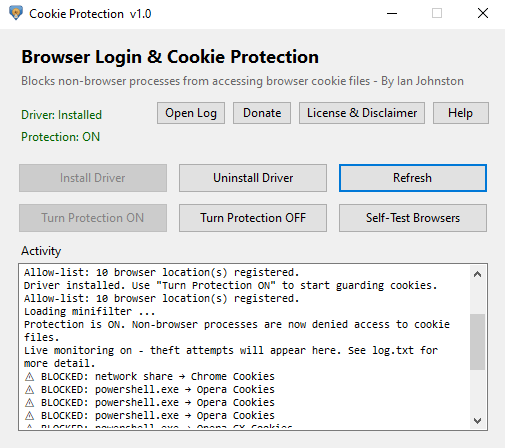
- The app - A GUI that installs and uninstalls the driver, turns protection on and off, shows blocked attempts live in its Activity box, and lets you test that each browser is protected.
"Genuine browser" means the real browser program at its real install location. When you install the driver or turn protection on, the app finds your installed browsers and gives the driver their full paths, so a fake chrome.exe copied to another folder is still blocked.
FEATURES:
- Blocks non-browser programs from reading browser cookie, login and encryption-key files.
- Full-path browser allow-list - renamed or copied fake browsers are blocked too.
- Blocks browsers started in headless or remote-debugging mode, a common way for malware to pull cookies out through the browser itself.
- Live Activity box showing every blocked attempt: which program, its process ID and the file it tried to read.
- Tray icon with pop-up notifications when something is blocked, and minimise-to-tray.
- Everything is also written to log.txt in the app's folder, with date and time.
- SELF-TEST BROWSERS - tries to read each browser's cookie file and reports BLOCKED or READABLE.
- Tamper resistance - while the driver is running, its settings in the registry can't be changed or deleted, and it can't be unloaded except through the app. An attempt to unload it is blocked and logged.
- Built-in Help and Licence, plus Donate.
WHAT IT DOES NOT STOP:
No single tool stops everything, so please keep your antivirus and common sense. Cookie Protection does not stop:
- Malware running with administrator rights, which can remove the driver (e.g. by deleting it and rebooting, or from Safe Mode).
- Reading the browser's memory, or injecting code into a running browser. This is a Work In Progress.
- Raw disk or shadow-copy (backup snapshot) reads of the files.
- Someone using your logged-in browser in person directly.
OS TESTED:
- Win10
- Win11
64-bit Windows only. Win7 and 32-bit Windows are not supported.
DOWNLOADS:
Coming soon on my Github, as a portable zip (no installer - just unzip and run).
If you'd like to help test it before then, please contact me.
[all files scanned with BitDefender Antivirus prior to upload]
SOURCE CODE:
This app may be used and distributed freely for strictly non-commercial, non-business purposes only. If you wish to use it within your business then contact or PM me.
The source code (Visual Studio 2022 solution with the C# app and the C driver) will be available on my GIT alongside the download.
HOW COOKIE PROTECTION WORKS - THE TECHNICAL SIDE:
What it blocks
- The driver is a file-system minifilter (FltMgr, FSFilter Activity Monitor load order group, altitude 370000). Info here.
- It registers a pre-operation callback on IRP_MJ_CREATE, so it sees every attempt to open a file before the file system does.
- If the path is one of the browsers' sensitive files (Chromium: Cookies, Login Data, Local State, Web Data. Firefox: cookies.sqlite, logins.json) and the calling process isn't a trusted browser, the open fails with STATUS_ACCESS_DENIED. The caller just sees "access denied", and nothing in the file is read.
- It also watches rename and hardlink operations (IRP_MJ_SET_INFORMATION). A non-browser process can't give a protected file a second name with a hardlink, or rename it, to read the data under a path that dodges the name check. Opening by file ID or 8.3 short name is already covered, as the driver checks the normalised path.
- Copies from another computer through a network share are blocked too. Windows' file-sharing server opens files in kernel mode, so the driver recognises its opens by the SMB/NFS server's extra create parameter (GUID_ECP_SRV_OPEN / GUID_ECP_NFS_OPEN) and refuses them for protected files.
- Only files inside the known browser data folders are guarded (Chrome, Edge, Brave, Vivaldi, Chromium, Opera, Opera GX and Firefox). Other apps built on Chromium, such as Copilot or WebView2 apps, keep their own data and aren't affected.
- Every other file open just gets a quick name check and passes straight through. I've not noticed any slowdown.
Who is allowed
- The app finds the installed browsers (App Paths in the registry plus the usual install folders), converts their paths to NT device paths, and writes them to the driver's AllowedImages value (REG_MULTI_SZ).
- The driver compares the calling process's full image path exactly against that list, so a malware file renamed to chrome.exe in %TEMP% is still blocked. That was the obvious bypass of a name-only check.
- Opera and Opera GX need a little extra handling: their exe lives in a version-numbered folder that changes on every update, and the install root is user-writable. Rather than trusting the whole folder (which a planted exe could abuse), the app resolves the actual opera.exe path(s) and pins each one exactly, re-resolving the list every time protection is turned on.
- A PsSetCreateProcessNotifyRoutineEx callback tracks browser process IDs as they start. Browsers already running when the driver loads are checked by image path the first time they open a protected file.
Browser abuse
- Malware can try to get the browser itself to hand over cookies, by starting it with --remote-debugging-port, --remote-debugging-pipe, --headless or --dump-dom and asking it for them.
- The process-creation callback checks the command line, and any browser started with those switches is treated as untrusted, so it's denied access to the cookie files too.
- Any helper processes it starts are untrusted as well. This matters because in Chrome the cookie file is opened by its network service helper, not the main browser process.
Tamper resistance
- The control app runs elevated (administrator), so Windows UIPI blocks any lower-privileged process from sending synthetic mouse clicks or window messages to it - malware can't drive the "Turn Protection OFF" button to disable the protection.
- Protection is enforced entirely in the kernel driver, not the app, so killing the app leaves the filter loaded and still blocking - terminating the GUI doesn't turn protection off.
- The app is safest installed under Program Files (admin-only). If it's run from a user-writable folder it warns you, because an elevated app sitting in a writable folder could be hijacked by a planted DLL.
- A CmRegisterCallbackEx registry callback blocks user-mode changes, deletes and renames under the driver's own service key while it's loaded. Malware can't empty the allow-list or change the driver's settings.
- The filter's unload callback returns STATUS_FLT_DO_NOT_DETACH unless the app has authorised the unload first, so "fltmc unload CookieMiniFilter" is refused, and the refusal is logged. The driver also registers with FLTFL_REGISTRATION_DO_NOT_SUPPORT_SERVICE_STOP, so "sc stop" / "net stop" are refused as well.
- The app authorises an unload with a message over the filter communication port. The port is restricted to admin/SYSTEM and allows one connection.
Logging
- Every block is sent from the driver to the app over a filter communication port (FltCreateCommunicationPort / FilterGetMessage), with the process name, PID and file path.
- The Activity box shows a concise one-line summary live, e.g. "BLOCKED: powershell.exe -> Chrome Cookies", and pops up a tray notification. The full detail - process, PID and the exact file path - is written to log.txt, which an Open Log button opens in Notepad.
- Every block gets its own line in both, so nothing is hidden. The tray icon and taskbar button also show a status dot: green = protected, flashing red = protection off.
How it's been tested (so far)
- Copying the cookie files with cmd, PowerShell and File Explorer - blocked.
- PowerShell copied to %TEMP% and renamed chrome.exe - blocked (full-path check).
- Hardlink to the cookie file (mklink /H) - blocked.
- Renaming the cookie file (ren) - blocked.
- Opening it by its 8.3 short name (USERDA~1) - blocked.
- esentutl /y, the built-in tool real infostealers use to copy locked browser databases - blocked.
- robocopy /B (backup mode, run as administrator, skips file permissions) - blocked.
- A copy running as SYSTEM via a scheduled task - blocked.
- Headless Chrome started on the real profile - denied the cookies.
- Copying via a \\localhost share on the same PC - blocked.
- fltmc unload CookieMiniFilter - refused and logged.
- sc stop CookieMiniFilter - refused.
- The app's Self-Test reads every browser's cookie file - all blocked with protection on, all readable with it off.
- External - Copying the cookie file from another PC over a network share - blocked.
- External - A PowerShell remoting (WinRM) session from another PC - blocked.
- Chrome, Edge, Brave, Vivaldi, Opera and Firefox all browse, log in and save cookies normally with protection on.
- All tests run on Windows 10 22H2 (19045) in a VirtualBox VM, with a test-signed driver.
What it doesn't stop
- Malware you’ve already given full control of the PC (e.g. by clicking Yes on a Windows “allow this app to make changes” prompt). Most infostealers run with normal user rights, and that’s what this stops.
- Reading browser memory, or injecting code into the browser. I tried ObRegisterCallbacks to strip PROCESS_VM_READ, PROCESS_VM_WRITE, CREATE_THREAD and similar rights from handles to browser processes, but it broke Chromium and Firefox multi-process start-up (and antivirus hooking into the browser), so it's off for now. This part is a work in progress.
- Raw disk reads or Volume Shadow Copy snapshots of the files. Both need admin anyway.
- Someone using your logged-in browser in person.
Why not just use file permissions?
- Infostealers usually run as your own user account, which already has permission to read your own browser files, so NTFS ACLs can't tell the browser and the malware apart. The driver decides by which program is asking, not which user.
Other
- The driver doesn't start automatically when Windows boots. As it's a kernel driver I thought that was the safest choice, because if there's ever a problem a reboot clears it. After a reboot, open the app, load the driver and click Turn Protection ON.
INSTALLATION INSTRUCTIONS:
Fresh Installation of Cookie Protection:
1. Download and run the .msi installer - CookieProtection.msi
2. The program is installed at: C:\Program Files\CookieProtection\CookieProtection.exe
3. A desktop shortcuts is created to run the app.
Updating to a new version:
1. In the old app, click TURN PROTECTION OFF, then UNINSTALL DRIVER. Shutdown the app.
2. Run the new .msi installer.
Installation Notes:
1. Requires .NET Framework 4.8, which is already part of Windows 10 & 11.
2. The app isn't code-signed, so Windows SmartScreen may say "Windows protected your PC" - click More info > Run anyway.
3. Installed a new browser? Turn protection OFF and ON again, so the app adds the new browser to the allow-list.
4. To remove it completely, click TURN PROTECTION OFF, then UNINSTALL DRIVER, then delete the folder.
INSTRUCTIONS / NOTES FOR USE (basic only):
The built-in HELP button explains everything in more detail.
INSTALL / UNINSTALL DRIVER:
Adds or removes the driver from Windows. Uninstalling turns protection off first.
TURN PROTECTION ON / OFF:
Loads or unloads the driver. Each time protection is turned on, the app refreshes its list of genuine browsers. The driver only allows itself to be unloaded when the app asks, so malware can't simply switch it off.
ACTIVITY:
Shows each blocked attempt live, e.g. BLOCKED theft: powershell.exe (pid 1234) tried to read ...\Cookies. The same lines, with date and time, are saved in log.txt. When the app is minimised to the tray, blocked attempts pop up as notifications.
SELF-TEST BROWSERS:
The app itself isn't a browser, so it should be blocked too. It tries to read each browser's cookie file and reports BLOCKED (protected) or READABLE (not protected).
REFRESH:
Re-checks the driver and protection status.
SUPPORTING Cookie Protection:
If you want to support the development or find the program useful, please consider donating via PayPal , or an Amazon UK eGift Card to my email address (also from the DONATE button in the app).
For the most part, your money & support goes towards a Microsoft-accepted code-signing certificate, so the driver can be properly signed and the app released.
LICENCE & USAGE:
Cookie Protection is provided free of charge for personal, non-commercial use only.
The source code is made publicly available and may be used, modified and redistributed for non-commercial purposes only.
Neither Cookie Protection nor its source code, in whole or in part, may be used for commercial purposes without a separate commercial licence from the author.
This includes use within businesses and organisations.
Please contact the author to discuss commercial licensing arrangements.
Browser names and trademarks belong to their respective owners. Cookie Protection is not affiliated with or endorsed by any browser maker.
DISCLAIMER & LIMITATION OF LIABILITY:
Cookie Protection and its source code are provided "as is", without warranty of any kind, express or implied. Use of this software and source code is entirely at the user's own risk.
Cookie Protection adds a layer of protection against one kind of attack. It is not a replacement for anti-virus software, and it cannot guarantee that your accounts or data won't be stolen.
It installs a kernel driver, which runs at the core of Windows.
To the fullest extent permitted by law, the author shall not be liable for any loss, damage, data loss, loss of use, loss of profits, or other direct, indirect, incidental or consequential loss arising from the installation, modification or use of, or inability to use, this software or source code.
